






Don’t want to continue testing iOS 27? You can stop your iPhone from receiving iOS 27 betas without erasing your iPhone.
There are all kinds of reasons you might want to stop getting iOS 27 betas. Maybe you are facing usability or stability issues. Perhaps your apps are not working as they should. Keep reading to learn how it’s done.
Also: What Is Siri AI? Everything Apple Changed About Siri in iOS 27
How to Turn Off iOS 27 Beta Updates
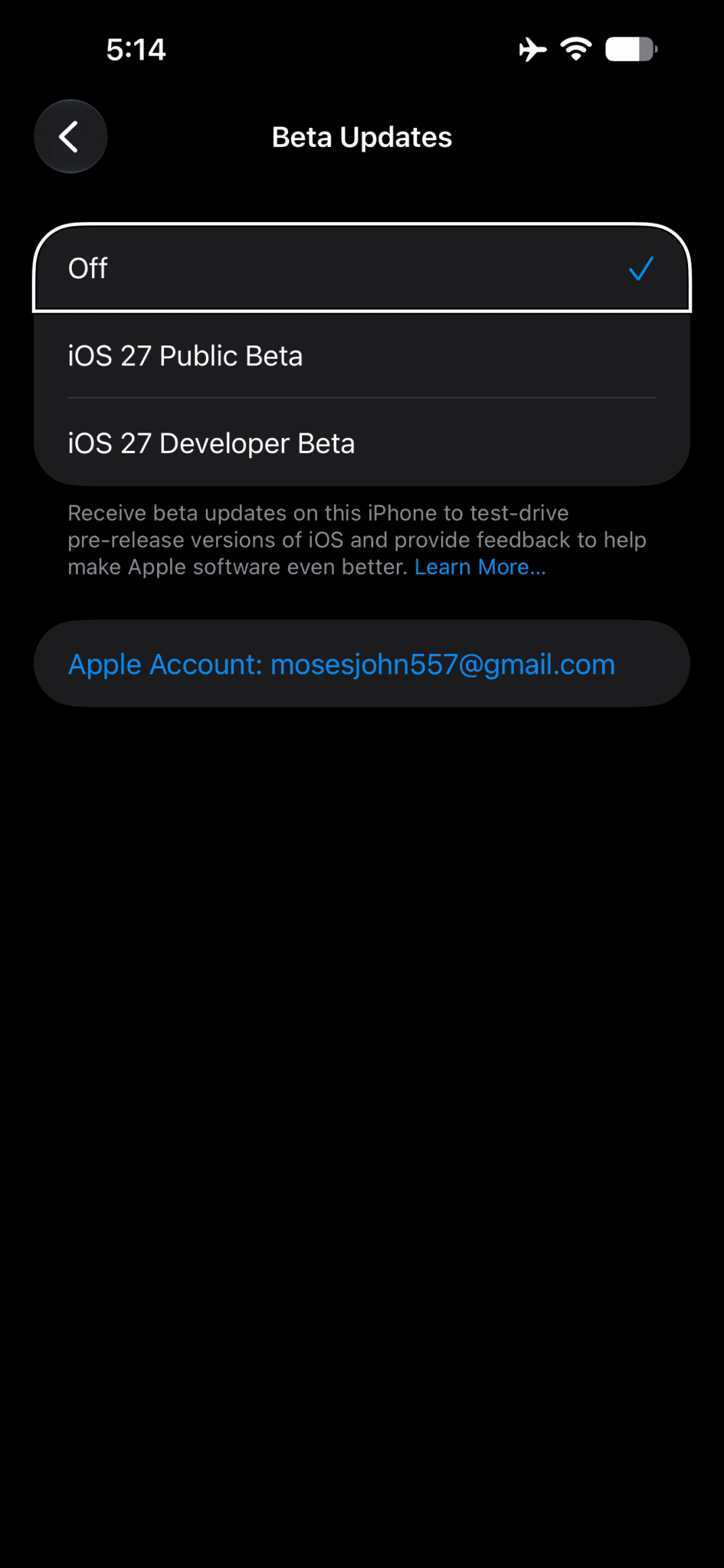
To stop receiving iOS 27 betas, all you need to do is turn off beta updates.
- Go to Settings.
- Tap General.
- Tap Software Update.
- Tap Beta Updates.
- Tap Off from the list of options.
Your iPhone will no longer download iOS 27 betas. The beta currently installed stays on your device until you install a public release of iOS.
Install the Next Version of iOS
When the next commercial version of iOS is released, you can install it from Software Update.
Frequently Asked Questions
To leave the Apple Beta Software Program, you must first visit Apple beta software program page, sign in with your Apple account, then click the Leave Program link. If you leave, you will stop receiving emails about the Apple Beta Software Program and will no longer be able to submit feedback with Feedback Assistant.
To go back to a prior release, you can restore your iOS device from the backup that you created before installing the beta.