





Apple’s Beta Software Program lets you run pre-release versions of iOS, iPadOS, macOS, tvOS, watchOS, HomePod software, and AirPods firmware before they reach everyone else.
Membership means test-driving those pre-release builds and telling Apple what you think of them, and that feedback goes into shaping the software the rest of the world eventually installs.
Beta versions of iOS, iPadOS, macOS, tvOS, watchOS, HomePod software, and AirPods firmware are all open to testing ahead of wider release. New features can be fun, but we recommend downloading a beta only onto something other than your primary device, in case the new software causes issues.
Apple also gives beta testers an app called Feedback. Testers use it to report issues in the new software, so they can be addressed before general release. Signing up is what gets you into those next releases and lets you help push them across the finish line.
How to Join the Apple Beta Software Program
Signing up takes a few steps. The steps below cover iPhone.
- Open Safari and go to beta.apple.com.
- Tap Sign up.
- Sign in with the Apple Account connected to your iPhone.
- Accept Apple’s beta software agreement by tapping agree.
- You should already be in the iOS section, but if not, tap iOS under Guide for Public Betas.
- Tap enroll your iOS device under the Get Started section.
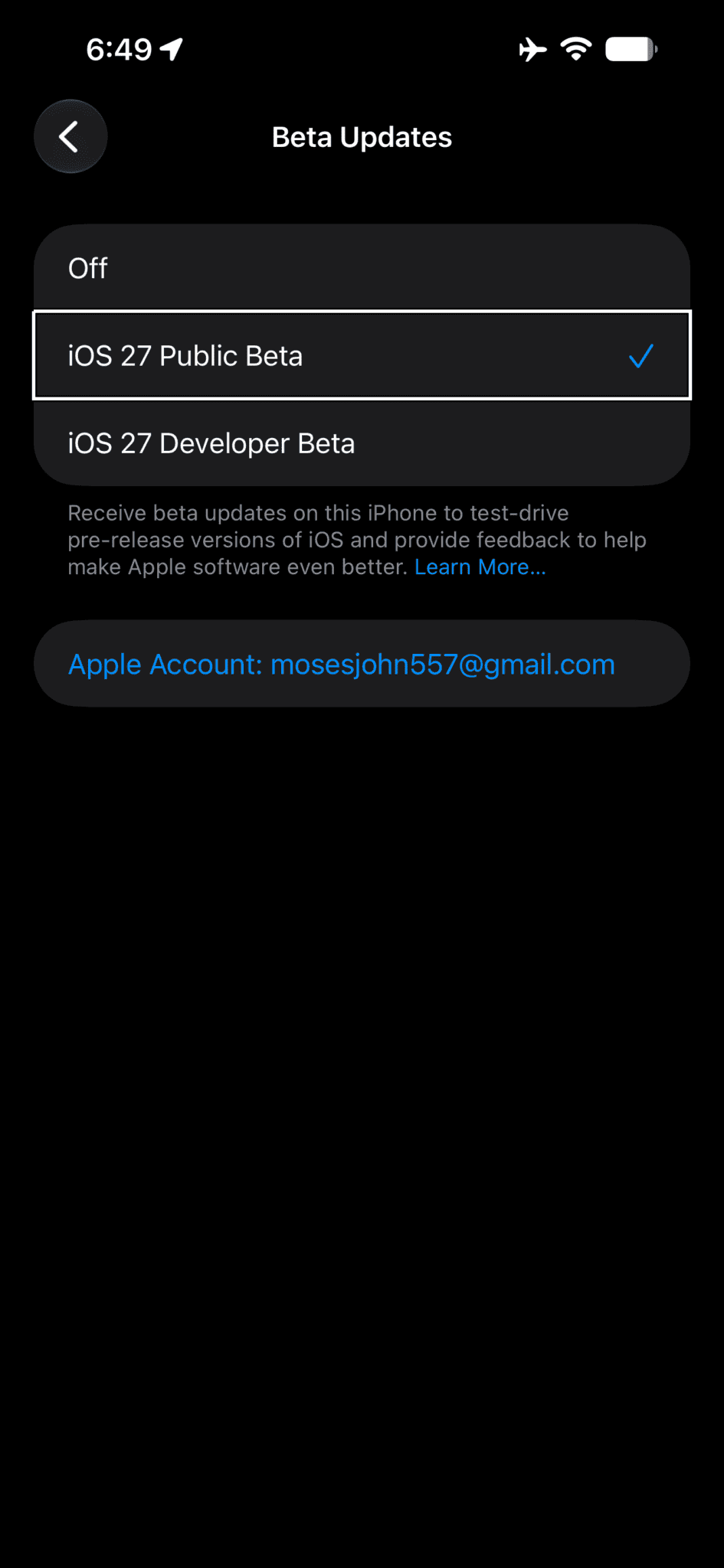
- Go to Settings > General > Software Update > Beta Updates and choose the iOS beta you’d like to install.
Installing the iOS Beta
The install happens inside Settings itself. You pick up the iOS beta from Software Update, which appears under General, and if no beta is available yet, a notification arrives once one is released.
See also: How to Install the iOS 27 Public Beta on Your iPhone
Participation
You enroll the devices you want to test on. Enrollment gets you access to the betas themselves, plus the chance to try out the latest features before they ship. Anything you run into can go directly to Apple through the Feedback Assistant app.
Frequently Asked Questions about Apple Beta Software Program
The Apple Beta Software Program is a testing program that gives users pre-release software before Apple has commercially released it. The feedback you provide on quality and usability helps Apple identify issues, fix them, and make Apple software even better.
Beta software has not yet been commercially released by Apple, so it may contain errors or inaccuracies and may not function as well as commercially released software. Back up your iPhone or iPad before installing one, and back up your Mac using Time Machine. Apple TV, HomePod mini, and HomePod (2nd generation) keep their data and purchases in the cloud, so those devices need no backup.
Beta software belongs only on non-production devices that are not business critical. Apple strongly recommends installing on a secondary system or device, or on a secondary partition on your Mac.
You can enroll iPhone, iPad, Mac, Apple TV, HomePod mini, HomePod (2nd generation) or Apple Watch. Any of those gets you access to the latest betas, as well as the subsequent updates that follow them.
The iOS, iPadOS and macOS betas include Feedback Assistant as a built-in app. Open it from the Home screen on your iPhone or iPad, or from the Dock on your Mac. The help menu of any app also has a Send Feedback item that opens it.
Anyone running the tvOS, HomePod software, watchOS beta or AirPods beta submits through Feedback Assistant on an enrolled iPhone, iPad or Mac. When you experience an issue, or something does not work the way you expect, Feedback Assistant sends it directly to Apple.
The Apple Beta Software Program is open to anyone with a valid Apple Account, provided they accept the Apple Beta Software Program Agreement during the sign-up process. An iCloud account is already an Apple Account, and Apple recommends using that one.
Yes. The program is free and so is the software.
Testing is voluntary, and there is no compensation for taking part.
Yes. Beta software counts as Apple confidential information. Keep it off any system you do not directly control or that you share with other people.
Do not blog about the beta software, post screenshots of it, tweet about it, or publicly post information about it, and do not discuss it with or demonstrate it to anyone outside the Apple Beta Software Program. Once Apple has publicly disclosed technical information about a beta, that information is no longer considered confidential.
Apple uses whatever contact information is associated with your Apple Account. You can keep it up to date at account.apple.com.
The Apple Beta Software Program collects feedback on pre-release software. The Apple Developer Program allows developers to test and build applications. Participants in one program may also receive different beta software from participants in the other, and if you are a developer, you get the benefit of the additional resources available through the Apple Developer Program.
If you are taking part in an invitation only program, follow the instructions in your invitation email, or log in with your Apple Account to view the invitation.
Not while the beta is installed. If you need further assistance, you must restore to previously-released software before contacting AppleCare. A beta may contain errors or inaccuracies and may not function as well as commercially released software, and Apple encourages you to submit feedback when you run into them.
No. Installing the beta software leaves your hardware warranty intact.
An enrolled device receives new versions of the beta automatically from Software Update. You may unenroll it at any time so that it no longer receives those updates. When the next shipping release of iOS, iPadOS, macOS, tvOS, HomePod software, watchOS or AirPods firmware arrives, you can install it from Software Update.
Whether you can get back to a prior shipping release of iOS, iPadOS, macOS, tvOS, HomePod software, watchOS or AirPods firmware depends on the device. Always back up your iPhone, iPad or Mac first. Apple TV, HomePod mini, and HomePod (2nd generation) store data and purchases in the cloud, so there is no need to back those up.
That backup is what returns you to a previously-released version of iOS, iPadOS, or macOS. Apple Watch is a one-way trip: once the beta is installed, it cannot be restored to previously-released OS versions. AirPods work the same way, with no route back to previously released firmware versions. The device will continue to run the beta firmware until an updated non-beta software version is released.
Head to the Unenroll page and follow the instructions there to remove your Apple Account from the Apple Beta Software Program.