

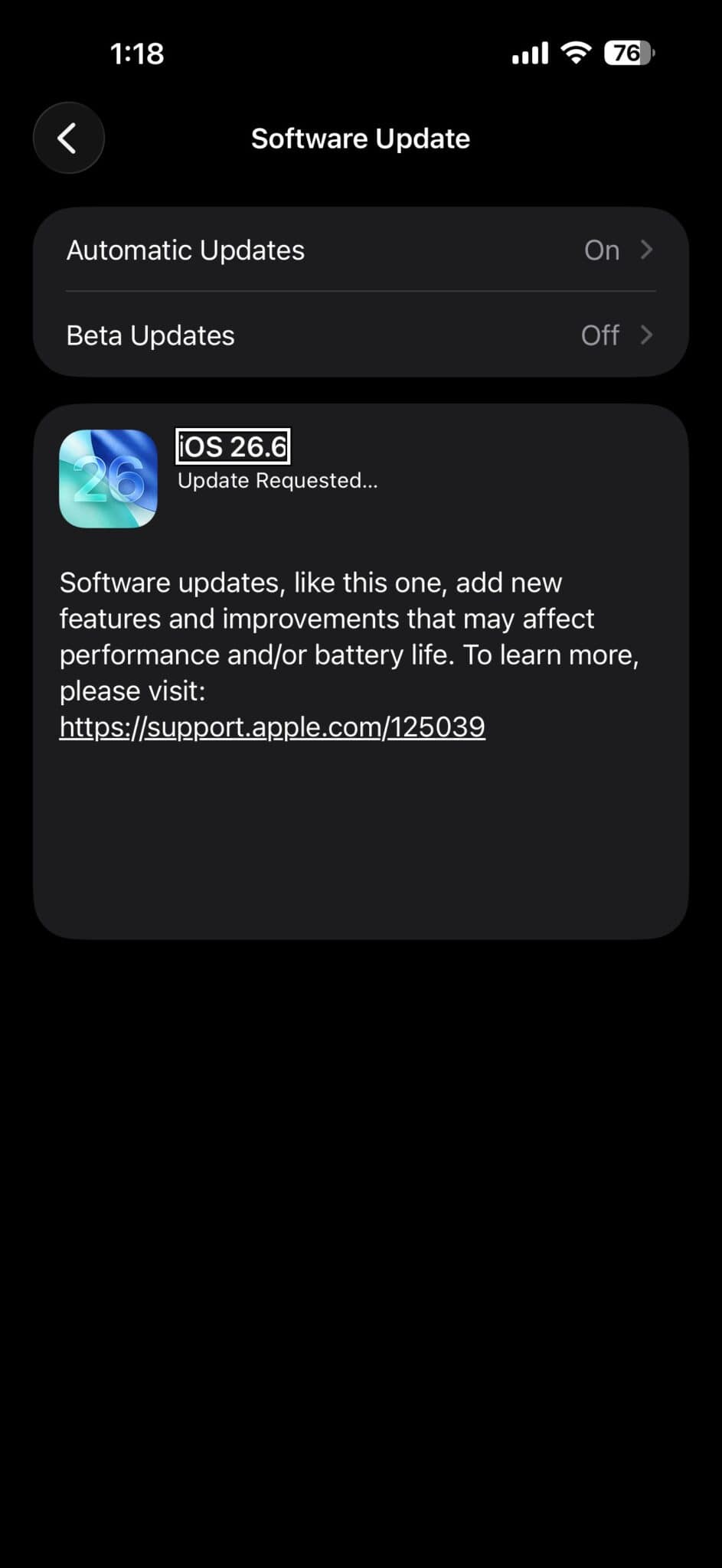

On July 28, Apple released iOS 26.6 to the public. iOS 26.6 is available around the world at the same time for everyone on all iOS 26 supported devices. iOS 26.6 comes a month after the launch of iOS 26.5.2, a security update. So what’s new in iOS 26.6? Here is everything you need to know.
iOS 26.6 can be downloaded on eligible iPhones over-the-air by going to Settings > General > Software Update. If you don’t see the update, pull down to refresh, or go back to the previous screen and back to the software update screen, and it should appear.
However, if you’re running iOS 27 beta 4 or public beta 2, you won’t see the update, as you’re on a newer version. The only way to install iOS 26.6 would be to downgrade using a computer. This update does include some changes as well as bug fixes.
Preparing the Spotlight index for iOS 27
The update optimize the Spotlight index in preparation for iOS 27. Apple is beta testing iOS 27, and the software is set to launch this September alongside new iPhone models. Apple’s release notes say the update includes bug fixes and security updates and optimizes the Spotlight index to prepare for iOS 27.
The update is preparing the overall Spotlight search, all the information on your phone, getting it ready to transfer over to iOS 27 when that releases later in 2026.
Visible changes
There aren’t a lot of visible features you can see in iOS 26.6. Apple appears to be working under the hood a lot in this update, specifically with things such as contacts.
Blocked contact limits
Contacts are one thing you could see, depending on your contacts and if you’re blocking contacts. You can block contacts from the Phone app, Phone settings, or the Contacts app itself.
If you’re blocking different contacts and you have up to 3,000 blocked contacts, you may get a new pop-up that says you’ve reached a limit and you can’t block anymore. It takes 3,000 different blocked contacts for this to show up. But if they are blocked in your block list, it will let you know you have a limit.
Stolen Device Protection
Within the code throughout the betas, it looked like Apple was going to add a new security feature in Privacy & Security settings with Stolen Device Protection. If someone tried to snatch your phone out of your hand quickly or steal your phone, it would sense that movement and then lock automatically.
However, we’re not seeing that feature, or maybe they’ll turn it on on the server side. Hopefully they add it soon, or maybe they’re waiting for iOS 27.
Splash screens
During testing, I did see a couple splash screens in particular. One of them was in the Games app. When I went into Games for the first time, it popped up again, listing what’s new in Apple Games: Deals and Offers, Never Played library filter, Last Updated library sort, and Quick Launch. It pops up every time with a new installation.
The only other message I received had to do with Safari, where it was telling me how to use tabs. I don’t know if they’ve just pushed that out again, making it sort of refreshed.
That appears to be what’s contained in this update, as far as what we can see or the different changes they’ve made.
Region selection
There was an issue where a region was specifically selected and how it would be applied to your device. The issue appears to be resolved in iOS 26.6.
The respring bug
Apple has also fixed the respring bug. Prior to this update, if you pressed and held on the Home Screen, tapped a widget, tapped away from it, then selected a page using the dots at the bottom, it would completely reboot or respring the display. Then it would come back to your main screen.
That has now been resolved in iOS 26.6. If you now tap the widget and then tap the bottom dots, it works every time.
CarPlay connectivity
Apple CarPlay connectivity issues also appear to be resolved in iOS 26.6. CarPlay seems to be working much better for people where it was disconnecting and reconnecting, or just disconnecting overall. It was also intermittent with Apple Music. That may take a few days to measure. But so far it looks like they have resolved those issues in this update.
The wallpaper dimming bug
The wallpaper dimming bug appears to be finally fixed. It’s nice and vibrant, and it doesn’t desaturate a ton when you swipe home. The issue appears to be resolved in iOS 26.6.
Other bug fixes
Apple mentioned these fixes the other day with the RC release. They’ve resolved a few different issues with HealthKit. In Messages, they fixed an issue with HDR screenshots that might appear garbled when sent. They’ve also resolved Object Capture, where capture and reconstruction might fail.
They’ve also resolved an issue with stickers where you might be unable to create new stickers or see existing stickers when sticker data becomes corrupted. The issue could persist to other devices that were synced via iCloud. They’ve also resolved some other things with StoreKit.
We’ll know even more after they release it, as they typically release what they’ve fixed with enterprise, but they don’t typically release that until after it’s released to the public or the day after.
Security updates
According to Apple’s release notes, iOS 26.6 include security fixes for the iPhone.
Upcoming releases
The week of July 28 should be pretty much just releases of iOS 26. However, based on what we’ve seen in the past, we could see iOS 27 betas updated, but I would expect those the week of August 3. I would expect iOS 27 beta 5 as well as public beta 3 as soon as Monday, August 3, or maybe Tuesday, August 4. We should have weekly betas after that, with a public release sometime in mid September.
We could see iOS 26.7 betas. However, I don’t really expect those, since this one specifically mentions that iOS 26.6 is preparing for iOS 27. Maybe we’ll see an iOS 26.6.1 if there are additional issues or security updates they need to push.
But this could be the last version that we see. We don’t really know so far. There have been no hints that there’ll be additional releases, as Apple is focused on iOS 27. Since iOS 27 supports all of the same devices as iOS 26, refines them, and updates performance, I don’t really see the need to stay on iOS 26, but we’ll have to wait and see what they do there.
Thermals
Thermals seemed to be managed much better in iOS 26.6. In my Geekbench 7 testing, the iPhone 17 Pro Max reached around 34°C at its hottest point.
That’s nice and cool compared to what we’ve seen before. It’s much cooler than running iOS 27 as well. It’s doing quite well.
Benchmark scores
Geekbench 7 scores are going to be a little bit different. It’s more representative of what iOS can do with the current hardware, putting it through different tasks. Make sure if you’re comparing the numbers that you’re using Geekbench 7, which was newly released.
On Geekbench 7, the iPhone 17 Pro Max scored 3,220 in single-core performance and 8,338 in multi-core performance. The previous Geekbench would give up to 10,000, but if you’re comparing, you should have over 10,000 on that one, or 8,300 or so on this version. Keep that in mind if you’re testing it out, but this is the new version going forward.
Battery life
Many people have been happy with battery life throughout the betas. On my iPhone 17 Pro Max running iOS 26.6, i had 5 hours and 30 minutes of screen active time with 1 hour and 35 minutes of screen idle time, using 57% of the battery. This should easily get you through the day, 9 to 10 hours of screen on time, depending on how you’re using it. Most people are saying that coming from iOS 26.5.2 or older, they’re experiencing much better battery life.
Storage
Under General, then iPhone Storage, scroll to the bottom. iOS is taking up 21.97 gigabytes. This is quite good compared to iOS 27, where it’s 35.45 gigabytes with the last betas. iOS is 14.44 gigabytes compared to 16.16, and Apple Intelligence is 7.53 compared to 19.29.
Keep in mind when you’re installing an update, it’s overriding the other one. If it’s 8 gigabytes or so, it’s writing over the old update, not adding to the storage.
System data goes up and down as needed. You may see it go up to 60 gigabytes or so, maybe come back down to 2 gigabytes or less. It depends on what’s available and what it can use in the background.
Should you install iOS 26.6
If you’re on iOS 26.5.2 or older, I would absolutely install it, as it seems to be much better. After testing iOS 26.6, I found that performance feels noticeably smoother. Whether that’s the overall scrolling speed, opening of apps, or going in and out of things such as the App Library with ProMotion, it seems very smooth. It has the refinements that you would expect from iOS 26 in the early launch timeframe.
Whether that’s going into things like Weather and going in and out, RAM management seems to be better. There are occasional stutters still, but they are much improved compared to before. You’ll notice speed and refinement without any issues. Liquid Glass is working fine.
That’s everything with iOS 26.6: not a huge update, but an important one with security updates, some bug fixes, and getting us ready for the next big update with iOS 27.