







iOS 27 has some exciting new Apple Intelligence upgrades coming, but Siri AI features are missing on the iPhone 17. Here’s why.
With iOS 27, the latest base iPhone gets excluded from select features—just like in 2024
Back in June 2024, Apple Intelligence was unveiled with very limited hardware support in iOS 18. Apple said it would be available on iPhone 15 Pro or iPhone 15 Pro Max—that’s it.
At the time, that meant cutting off two of the company’s four latest and greatest iPhone models. The base iPhone 15 and iPhone 15 Plus were not supported.
For a company that typically extends new software features to old devices for many years, it was a surprising move.
But it was also expected to be a one-off. The understanding was that AI, especially on-device AI, comes with stricter hardware requirements. And when Apple Intelligence launched, it needed 8GB RAM minimum—thus, the more affordable iPhone 15 models missed out.
With iOS 27 though, history is repeating itself. Apple has once again introduced new AI features that its latest base model iPhone doesn’t support.
Why iPhone 17 doesn’t support certain AI features in iOS 27
There are two AI upgrades this year that won’t be coming to iPhone 17:
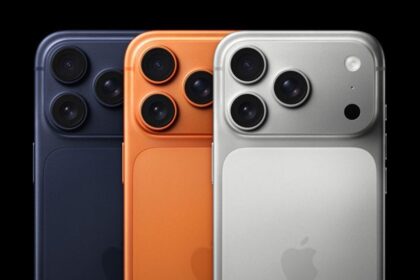
- iOS 27’s most powerful on-device AI model requires iPhone 17 Pro or Pro Max, or iPhone Air
- The same is true for a new Siri AI voice customization feature, which iPhone 17 won’t support
The base iPhone 17 is excluded because it ships with 8GB of memory, falling short of the 12GB threshold. The iPhone 17 Pro and iPhone Air have 12GB.
Apple confirmed that the most capable model carries stricter requirements. To run Apple’s most powerful on-device model, users will need one of the following devices:
- iPhone: iPhone Air, iPhone 17 Pro, or iPhone 17 Pro Max
- iPad: iPad with M4 or later with at least 12GB of unified memory
- Mac: Mac with M3 or later with at least 12GB of unified memory
- Vision Pro: Apple Vision Pro with M5
According to Apple’s press release, the new model specifically enables features including expressive voices and more advanced dictation. ”
This meanss the iPhone 17 owners will not get two features that depend on the model: more expressive Siri voices and a major accuracy improvement for system-wide dictation.
Everything else in iOS 27’s Siri AI rollout — personal context, onscreen awareness, web answers, the dedicated Siri app, Visual Intelligence, and Writing Tools — runs on the broader Apple Intelligence device list. That list still includes iPhone 15 Pro, the iPhone 16 series, and iPhone 17.
The 12GB requirement, in other words, does not refer to Siri AI wholesale, but improves how Siri sounds and how well it transcribes. Base iPhone 17 owners will still get the new chatbot-style assistant with iOS 27, they’ll just get the older voices and a less precise dictation engine.
Hopefully this is the last time we see such a stark cutoff of recent devices. iOS 27 in many respects is a reset for Apple Intelligence, with brand new, more powerful models being used.
In any case, it was disappointing when the first Apple Intelligence features weren’t available on iPhone 15. And now after iOS 27’s unveiling, though iPhone 17 users won’t miss out on nearly as much, it’s still unfortunate they don’t get the same support as Apple’s Pro and Air models. The standard memory requirement for Apple Intelligence has been 8GB since its introduction, so this marks the first time Apple has raised the bar for its most capable on-device features.